

Best Bloomberg Terminal Alternatives in 2026: In-Depth Review & Comparison
Updated · Reviewed against each product's current features and pricing
What are the best Bloomberg Terminal alternatives in 2026?
Amsflow is the best Bloomberg Terminal alternative for equity investors in 2026. It covers 70,000+ global stocks plus ETFs, mutual funds, indices, crypto, forex and commodities, with up to 100+ years of history on the deepest series, with a screener of 830+ metrics and 1,390+ filters on daily, weekly and monthly bars, pro charting, AI agents, alerts and portfolio analytics from $19/month. A Bloomberg Terminal is reported to cost about $32,000 per seat per year on a two-year contract.
The Bloomberg Terminal is still the reference for institutional finance: real-time data across every asset class, deep fixed-income and derivatives analytics, Bloomberg News, and the IB chat network most of the market uses. In October 2026 ASKB, its conversational AI agent built on Bloomberg data, became generally available. The catch is the price, the contract and a learning curve measured in months.
Most investors who look for an alternative work mainly in equities, funds and macro, and pay for far more terminal than they use. We compared six alternatives on data, screening, charting, AI, portfolio analytics, collaboration and cost.
How do Bloomberg Terminal alternatives compare?
A capability-by-capability breakdown across screening, charting, scripting, AI, alerts, research, portfolios and teams. Amsflow covers the most ground for equity work; Bloomberg, LSEG Workspace and FactSet lead on multi-asset institutional data, YCharts on advisor reporting, and Koyfin and TradingView on low-cost access.
included · partial or basic · not offered. Bloomberg, LSEG and FactSet do not publish prices; their figures are widely reported estimates for a standard seat and vary with content, exchange fees and contract. Not shown above: Bloomberg, LSEG and FactSet also cover fixed income and derivatives analytics, offer Excel add-ins and data APIs, and run real-time newswires (Bloomberg News, Reuters), none of which Amsflow offers; none of the three has self-serve sign-up. Other competitor features and prices as published or widely reported on the update date; where a capability exists only in part, or we could not confirm it, the cell shows partial.
Why look for Bloomberg Terminal alternatives?
Teams look beyond Bloomberg when the cost per seat is hard to justify for the work they do, which for many is equity research, screening, charting and portfolio monitoring.
What do modern Bloomberg alternatives get right?
- Monthly pricing a fraction of a terminal seat.
- Sign up and start the same day, with no install.
- Screens, dashboards and strategies built from plain language.
- Charting, screening, alerts and portfolios in one workspace.
- Shared work for small teams without enterprise contracts.
Where does Bloomberg Terminal fall short?
- About $32,000 per seat per year (reported), on a two-year contract, plus exchange fees.
- No self-serve trial or monthly plan.
- A function-code interface that takes months to learn well.
- Equity screening is powerful but built for experts, not quick idea generation.
- Overkill for investors who don't trade bonds or derivatives.
Transform your investment journey with Amsflow
Powerful Intelligence, Smart Alerts, Advanced Screening & Portfolio Tracking. Never miss movements, discover opportunities, analyze global markets. All in One Sleek Platform.
1. Amsflow: Best overall Bloomberg Terminal alternative for equity investors
Starting price: $19/month; a free 7-day trial
Amsflow covers the equity, fund and macro work most terminal users do every day, without the terminal. It spans 70,000+ global stocks plus ETFs, mutual funds, indices, crypto, forex and commodities, with up to 100+ years of history on the deepest series. Amsflow Screener 2.0: 830+ metrics and 1,390+ filters across fundamentals, 45 technical indicators, 44 candlestick and 16 chart patterns, divergences, Smart Money Concepts and 37 strategy signals with backtested win rates, on daily, weekly and monthly bars.
Research goes deep: statements, ratios, forecasts, peers, segments, valuation, insider and institutional reports, earnings-call transcripts with AI summaries and Management Guidance Integrity scoring. Flow Agent, an AI agent on the chart that writes indicators and strategies in FlowScript, backtests them, builds screens and sets alerts from plain language, on Amsflow Chart Engine II: 77 technical indicators, 59 drawing tools, 19 chart types, strategies and backtesting with no look-ahead, bar-by-bar Replay, custom intervals and layouts of up to 16 charts. Lisa answers questions in Ask and Research modes, X-Ray reads any stock in one click, and Dash builds a dashboard from a sentence.
For portfolio and macro work it adds multi-asset portfolio tracking with benchmarks, six-factor return attribution, dividends and a dividend calendar, exposure analysis, nine portfolio currencies, and broker import from CSV, Excel or JSON exports, plus sector and industry Rotation for 14 markets, global stock heatmaps, Movers (top gainers and losers in 14 markets), US fund-manager and congressional trading data, AI-summarized news and Fear & Greed sentiment for 10 markets. The Team plan ($380 per seat per month) shares watchlists, alerts, portfolios, Dash, Series, screeners and discussions, with Owner, Admin, Member and Guest roles.

What is Amsflow good at?
- A Team seat costs about a seventh of a reported Bloomberg seat; individual plans start at $19/month.
- Global screening on 830+ metrics and 1,390+ filters.
- AI that builds screens, dashboards, chart strategies and alerts from plain language.
- Pro charting with backtesting, Replay and 16-chart layouts.
- Earnings-call transcripts with AI summaries and Management Guidance Integrity scores.
- Portfolio factor attribution across six factors.
- Team watchlists, alerts, portfolios and discussions with roles.
- No contract and a free 7-day trial.
Where does Amsflow fall short?
- No free plan: a 7-day trial instead.
- No native mobile app yet; the web app is mobile-optimized.
- No bond analytics, listed options or futures data, Excel add-in, chat network or trade execution; Bloomberg remains the tool for those.
2. LSEG Workspace: Best for enterprise data coverage (formerly Refinitiv Eikon)
Starting price: Quote-based; reported about $12,000–$24,000/yr
LSEG Workspace replaced Refinitiv Eikon and is the closest like-for-like Bloomberg alternative: multi-asset real-time data, Reuters news, fixed income and FX depth, strong Excel integration and a Microsoft Teams tie-in. In June 2026 LSEG made Workspace AI Search generally available, with a Deep Research agent built in.
Pricing is quoted per content set on annual contracts; reported figures run from about $12,000 to $24,000 per user per year. It still takes training, and it is built for institutions rather than individual investors.
What is LSEG Workspace good at?
- Multi-asset institutional data and Reuters news.
- Strong Excel and Microsoft Teams integration.
- AI Search and a Deep Research agent.
- Usually cheaper than a Bloomberg seat.
Where does LSEG Workspace fall short?
- Enterprise pricing by quote, with no self-serve plan.
- Steep learning curve.
- Light pattern and technical screening.
3. FactSet: Best for institutional research and portfolio analytics
Starting price: Quote-based; reported from about $12,000/yr per user
FactSet is a favorite of asset managers and banks for fundamentals, estimates, portfolio analytics and risk models, with deep Excel and PowerPoint integration. Its Mercury AI assistant, Transcript Assistant and 2026 AI for Banking agents (in alpha) bring generative AI into the Workstation.
Pricing is negotiated by content on annual or multi-year contracts; reported per-user costs start around $12,000 a year and reach $40,000 or more fully loaded. Setup and training take time.
What is FactSet good at?
- Deep fundamentals, estimates and ownership data.
- Portfolio Analytics and risk models.
- Strong Excel and Office integration.
- Growing AI tools in the Workstation.
Where does FactSet fall short?
- Enterprise pricing by quote, with no self-serve plan.
- Significant setup and training.
- Light technical and chart-pattern screening.
4. YCharts: Best Bloomberg alternative for financial advisors
Starting price: From $3,000/yr per seat (Analyst)
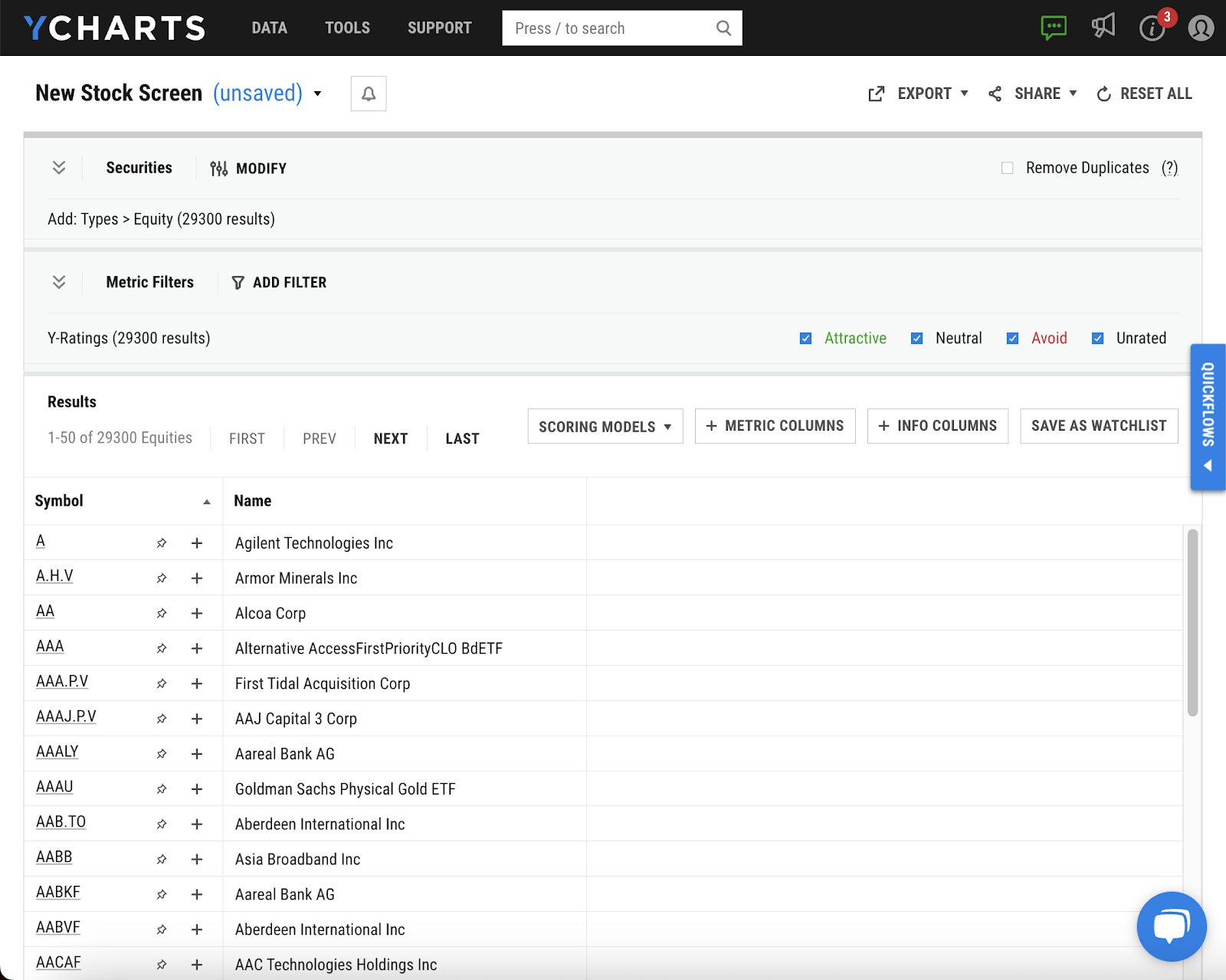
YCharts serves advisors with fundamental and fund data, client-ready charts and reports, model portfolios and proposals. Since June 2026 its AI agent, Y, writes commentary and runs scenario analysis.
It costs about $3,600 a year per user on Standard (Professional is about $500/month), focuses on US data and offers little for chart-driven screening.
What is YCharts good at?
- Client-ready reports and proposals.
- Deep fund and fundamental data.
- AI agent for advisor workflows.
- Excel add-in.
Where does YCharts fall short?
- Expensive for individuals.
- Mostly US coverage.
- Little technical or pattern screening.
5. Koyfin: Best budget Bloomberg alternative for dashboards
Starting price: Free; Plus $39/mo
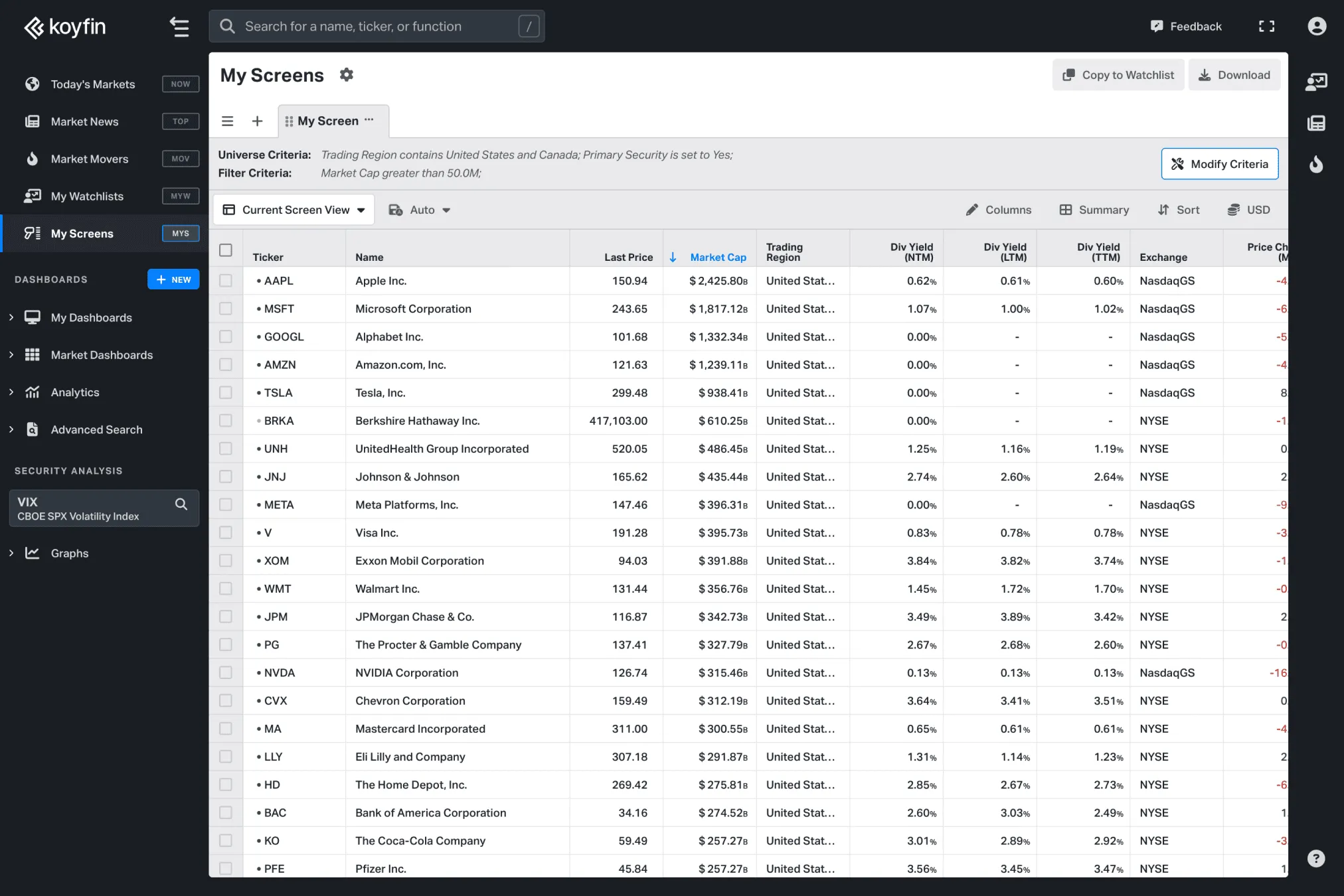
Koyfin is a clean, global market-data terminal with strong macro dashboards, charts of fundamentals and model portfolios for advisors. Its free plan is useful, and paid plans run from Plus ($39/month) and Premium ($79/month) to Advisor Core ($209) and Advisor Pro ($299).
Its only AI is Compare Matrix, an LLM research table in beta since October 2026. Technical screening is limited and there is no backtesting.
What is Koyfin good at?
- Global coverage with a free plan.
- Bloomberg-style macro and fundamental dashboards.
- Clean, modern interface.
- Native iOS and Android apps.
Where does Koyfin fall short?
- No natural-language screening; AI limited to a beta research tool.
- Light technical screening, no backtesting.
- Advisor features cost $209+/month.
6. TradingView: Best for charting and a trading community
Starting price: Free; paid plans from $12.95/mo billed annually
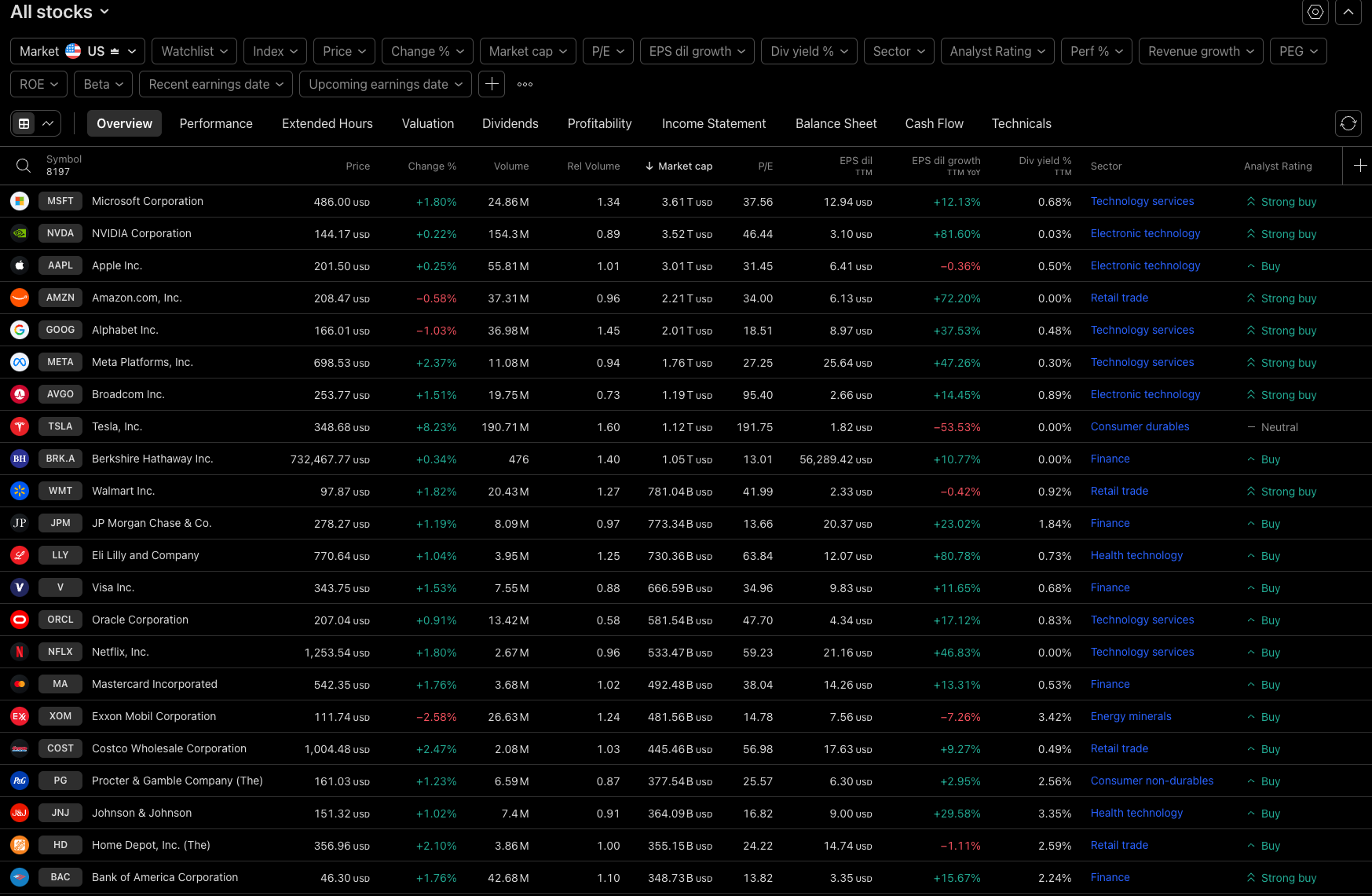
TradingView is the charting standard for many traders: global coverage across 150+ exchanges, Pine Script indicators and strategies, and a large community. Paid plans include 100 to 500 AI screener requests, and AI Copilot (a paid add-on since October 2026) answers questions and acts on the chart, from adding indicators to writing Pine Script and setting alerts.
Fundamental research and portfolio analytics are light, and it is not built for institutional workflows.
What is TradingView good at?
- Excellent charts and Pine Script.
- Global multi-asset coverage.
- AI screener and AI Copilot on paid plans.
- Native mobile and desktop apps.
Where does TradingView fall short?
- Limited fundamental depth and research reports.
- No portfolio analytics or team workspace.
- Real-time data for many exchanges costs extra.
How much do Bloomberg Terminal alternatives cost?
Prices run from free plans (Koyfin, TradingView) to about $32,000 per seat per year for Bloomberg; Bloomberg, LSEG and FactSet figures are widely reported estimates, and prices marked "billed annually" are monthly rates on a yearly plan.
Which Bloomberg Terminal alternative is best?
Amsflow is the best Bloomberg Terminal alternative for investors and small teams whose work centers on equities, funds and macro. It covers global markets, screens on 830+ metrics and 1,390+ filters on daily, weekly and monthly bars, and puts research, charting, AI, alerts, portfolios and team work in one place for $380 per seat per month on Team, or from $19/month for individuals.
Choose LSEG Workspace or FactSet if you need Bloomberg-scale multi-asset data at a somewhat lower price, YCharts for an advisory firm, and Koyfin or TradingView for low-cost dashboards and charts. Keep Bloomberg for fixed income, derivatives, IB chat and execution.
How much does a Bloomberg Terminal cost?
Bloomberg does not publish prices; a single seat is widely reported at about $32,000 a year (about $2,665 a month), with multi-seat pricing around $28,000 per seat and a two-year contract. Amsflow starts at $19/month, and its Team plan is $380 per seat per month.
Is there a free Bloomberg Terminal alternative?
Koyfin and TradingView have useful free plans for dashboards and charts. Free plans leave out AI, deep screening and team features; Amsflow offers a free 7-day trial of everything instead.
Can a Bloomberg Terminal alternative replace it?
For equity, fund and macro research, yes: Amsflow covers screening, research, charting, alerts and portfolios at a small fraction of the cost. Teams that trade bonds or derivatives, or depend on IB chat, usually keep at least one Bloomberg seat.
Transform your investment journey with Amsflow
Powerful Intelligence, Smart Alerts, Advanced Screening & Portfolio Tracking. Never miss movements, discover opportunities, analyze global markets. All in One Sleek Platform.
What customers say about Amsflow
In their own words, from customers who use Amsflow.
“Amsflow packs a lot into one place without feeling overly complicated. I like being able to research stocks, compare financials, use the screener, set alerts, and dig into charts without bouncing between several different sites. The AI tools are useful for getting a quick second look at a company, while the portfolio and planning features add some depth.”
“Amsflow looks like a powerful all-in-one solution for financial teams! Love the seamless integration of AI insights and collaboration tools.”
“That a great tool and after you go ahead you find the point that you like. For me perfect to make a portfolio and check it out. And also Support with good support. And also nice dashboard. I like it very well and happy with selection (after seaching other tools in internet). For me perfect.”
“Great software for stock monitoring and trading. Both Amsflow and my personal investment account matches in terms of profit and losses. Only wished that choosing a date would generate the price like Tykr for that specific day, but I get why it shouldn't. I love how I could generate an AI report for the income statement and balance sheet for each company and it condense it into an easy to digest format.”
“This AI-based stock analysis tool is spot-on I feel, and seems to give good, rounded advice and results. The UI and layout are easy to follow and so far, I've not run into any major issues. Overall, a good analysis tool to use!.”
“An absolute game-changer! The platform is super sleek and easy to use for financial analysis. Honestly, what impressed me the most is how amazing their customer support is—I asked them to add the Saudi market, and they actually did it so fast. Really appreciate their effort, and I totally recommend it to any investor!”
“Amsflow is an impressive all-in-one platform for financial research and portfolio tracking. The interface is sleek, intuitive, and packed with useful tools—from global screeners and detailed fundamental data to customizable alerts, technical charts, and AI-powered analysis through Lisa and X-Ray. The lifetime plan offers strong value, especially considering the frequent updates and expanding features like Dash, Planner, and Journal. I also appreciate that the team seems responsive to user feedback and actively improves market coverage and functionality. A great option for investors who want powerful analytics in one convenient web-based platform.”
“I can only offer my compliments. Initially, I gave it 4 stars in my review because the list of cryptocurrencies was very limited. Within a week, the founder contacted me to let me know that he had added 4,300 cryptocurrencies.”
“Nice software and value for money, it would be far better if it included API.”
“I've been using Amsflow Screener for a while now, and it's been a game-changer. Typing metrics and filters is easy and fast; it's by far the best screener I've used. Most screeners are complex, but Amsflow is intuitive.”
“Recently I’ve been using Amsflow to manage my portfolio across multiple assets, and it has truly simplified the way I track investments. Instead of juggling different platforms, I can monitor equities, indices, commodities, and watchlists all in one place. The real-time data and advanced charting tools give me clear insights into performance, trends, and correlations, which helps me make faster and more informed decisions. What I appreciate most is the flexibility of customizable watchlists. I can organize assets by sector, geography, or risk profile, which makes it easy to align the platform with my personal strategy. The analytics are robust, offering a detailed view of volatility, sentiment, and overall portfolio health. Navigation feels smooth and intuitive, so I never waste time searching for information. Overall, Amsflow has become a reliable tool that saves me time, reduces complexity, and gives me confidence in managing diverse investments efficiently.”
“Amsflow is an exceptional investment research and portfolio management tool that I highly recommend. .The fundamental data, and custom screening features empower me to make well- informed investment decisions.on top of it AJAY is very efficient and top of things, intially canada etf data were missing and he updated in just couple of hours, i am really impress with support”
“This is all web browser based, making it convenient to launch almost anywhere with internet. The GUI is easy to understand, and it provides great information with the opportunity to use AI to analyze things further. ”
“I am quite happy with the subscription that I have purchased. It is excellent value for money as compared to some of the other services out there. I purchased it for the real time global data available in Amsflow and it does have data on major global markets. The Developers are also super quick - I suggested 4 enhancements to make it easier to use this product - all these were implemented in 1 day. Overall very happy with the purchase.”
“X-Ray transforms hours of my analysis into instant insights. One click delivers comprehensive stock evaluation with technical signals, pivot points, and anomaly detection - it's like having a seasoned analyst at my fingertips.”
“Most screeners I've used are complex, hard to use, and overcomplicated, but Amsflow Screener is intuitive and straightforward. Finally, using a screener makes sense.”
“WORTH EVERY DOLAR!!!. The Amsflow support team is AWESOME, they solve the problem with indicators after weeks of hard work. They are all ears and that is for me a FULL 5 STARS APP. YOU CAN BUY WITH CONFIDENCE. I think this is a massive solid project. Thank you Amsflow.”
“It is a helpful stock analysis tool that makes it easier to evaluate market trends, company performance, and potential investment opportunities. The platform delivers clear insights in a simple, user-friendly way.”
“Been using Amsflow for a few months now, and it is my go-to tool for analysis. The Screener is the highlight! I can slice through global markets, filter by metrics that matter to me, and even get AI suggestions from Lisa. The combo of data + AI saves serious time and, more importantly, helps find 'HIDDEN GEMS'. feature, and you should explore it. The Series feature lets me line up different assets, sectors, or even macro indicators and actually see how they’re moving together (or not). Found a few interesting correlations I’d have 100% missed otherwise.”
“I’ve been using Amsflow for the last 6–7 months, and it’s by far the best financial research platform I’ve used. I was fortunate enough to get early access to the Amsflow Screener, and it truly feels magical. As far as I know, only two screeners offer global data: TradingView and the Amsflow Screener. I prefer the Amsflow Screener because it’s so simple to use, especially with its query builder. The Lisa Screener Agent is also incredibly helpful whenever I’m unsure which metrics to use. I would highly recommend it for finding swing stocks or for long-term investing.”
All reviews are from verified purchasers, collected after purchase. Reviews may not be representative of all customers and are not a guarantee of future performance or success.
Bloomberg Terminal alternatives FAQ
Why are investors looking for Bloomberg Terminal alternatives?
Cost (about $32,000 per seat per year, reported), two-year contracts and a steep learning curve. Many users need equity research, screening, charting and portfolio tools rather than Bloomberg's full multi-asset depth.
Does the Bloomberg Terminal have AI now?
Yes. Bloomberg launched ASKB, a conversational AI agent built on its data, news and research, in beta in February 2026 and made it generally available in October 2026. LSEG Workspace, FactSet, YCharts, TradingView (AI Copilot add-on), Koyfin (Compare Matrix beta) and Amsflow also offer AI tools.
What happened to Refinitiv Eikon?
Refinitiv is now part of LSEG, and Eikon has been replaced by LSEG Workspace, which carries the same data with a newer interface and AI tools.
What is the cheapest Bloomberg Terminal alternative for professionals?
For equity-focused teams, Amsflow's Team plan ($380 per seat per month) includes shared watchlists, alerts, portfolios, screeners and discussions. Koyfin and TradingView are cheaper for individuals but have lighter team features.
Which Bloomberg alternative has the best stock screener?
Amsflow Screener 2.0: 830+ metrics and 1,390+ filters on daily, weekly and monthly bars, with patterns by stage, divergences, Smart Money Concepts and strategy signals with backtested win rates, plus 1,270+ sortable columns, screener alerts by email or SMS after every close, and natural-language screens built by Lisa or Flow Agent.
Is there a Bloomberg alternative with a mobile app?
LSEG Workspace, FactSet and TradingView have native apps, as does Bloomberg. Amsflow is a mobile-optimized web app that works in any phone browser without an install.
What should I look for in a Bloomberg Terminal alternative?
The asset classes you actually cover, data depth, screening and charting, AI you can check, portfolio analytics, Excel needs, collaboration and total cost per seat.
